
Preferences
Select Preferences in the top bar to open the Preferences window. Every change is saved immediately to %APPDATA%\SnapKit\config.json.
Select Preferences in the top bar to open the Preferences window. Every change is saved immediately to %APPDATA%\SnapKit\config.json.
| Setting | Values | Default |
|---|---|---|
| Global capture shortcut | Any combination of Ctrl, Alt, Shift and Win, plus a key | Alt+Shift+S |
| After choosing the region, annotate right there (Enter copies) | On or off | On |
| Language | English, Português | The Windows display language |
| Interface theme | See Interface themes | Default |
| Closing the window keeps SnapKit in the tray | On or off | On |
| Start with Windows (in the tray) | On or off | Off |
| Check automatically (once a day) | On or off | Off |
Global capture shortcut
Starts a region capture from any app.
- Modifiers: Ctrl, Alt, Shift, Win, in any combination.
- Keys: A–Z, 0–9, F1–F12 and PrintScreen.
- A letter or digit needs at least one of Ctrl, Alt or Win, so it doesn't block normal typing. Function keys and PrintScreen can be used alone.
Select Apply shortcut to register the new combination. If Windows or another app already uses it, SnapKit keeps the previous shortcut and shows a message.
Updates
The Updates section shows the installed version.
- Check for updates asks GitHub for the latest version. Only SnapKit's name and version are sent.
- When a newer version is out, SnapKit shows Version x.y.z is available, and a ⬆ Version x.y.z button appears in the top bar.
- Update now downloads the installer, checks it against the SHA-256 checksum published with the release, installs it and opens SnapKit again. Your preferences, styles and library are kept. A portable copy (extracted from the zip) shows Open the download page instead.
- What's new opens the release notes.
- Check automatically (once a day) does the same check in the background, at most once a day. It only tells you about a new version: nothing is installed without a click from you.
See Why SnapKit is 100% local.
Interface themes
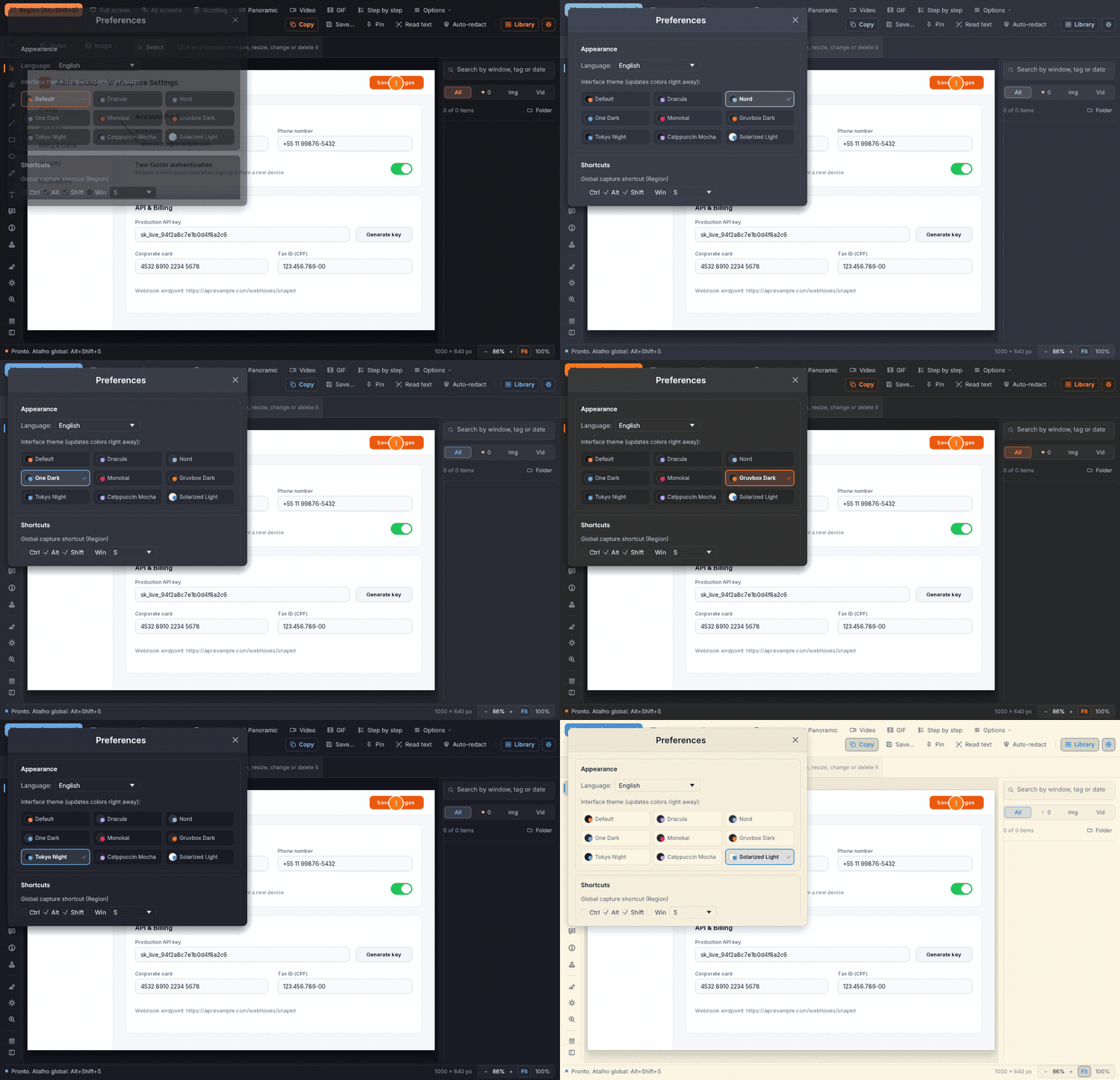
| Theme | Look |
|---|---|
| Default | Dark graphite with an orange accent |
| Dracula | Dark purple background, lilac accent |
| Nord | Steel blue background, ice blue accent |
| One Dark | Dark gray background, blue accent |
| Monokai | Greenish black background, pink accent |
| Gruvbox Dark | Warm gray background, orange accent |
| Tokyo Night | Night blue background, light blue accent |
| Catppuccin Mocha | Purplish blue background, light lilac accent |
| Solarized Light | The only light theme: beige background, blue accent |
The accent color is used for selections, links, the capture frame and the handles in the editor.
Settings saved outside the Preferences window
SnapKit also remembers these choices in the same file:
| Setting | Where you change it | Default |
|---|---|---|
| Capture delay | Options > Wait before capturing | No delay |
| Include the mouse cursor | Options > Include the mouse cursor | Off |
| Record system sound | Video panel > System sound | On |
| Record microphone | Video panel > Microphone | Off |
| Styles | Editor > Styles | None |
config.json
config.json is a plain JSON file. You can back it up or copy it to another computer. If it's missing or can't be read, SnapKit starts with the defaults; missing fields also take their defaults.
{
  "hotkey": { "ctrl": false, "alt": true, "shift": true, "win": false, "key": "S" },
  "delay_secs": 0,
  "include_cursor": false,
  "close_to_tray": true,
  "record_system_audio": true,
  "record_microphone": false,
  "quick_annotate": true,
  "styles": [],
  "theme": "Padrão",
  "language": "en",
  "check_updates": false,
  "last_update_check": 0
}| Field | Type | Description |
|---|---|---|
hotkey | object | Modifier flags and the key name, as listed in Global capture shortcut |
delay_secs | number | Capture delay in seconds: 0, 3, 5 or 10 |
include_cursor | boolean | Draw the mouse pointer in captures |
close_to_tray | boolean | The window's X hides SnapKit instead of quitting |
record_system_audio | boolean | Record system sound in videos |
record_microphone | boolean | Record the microphone in videos |
quick_annotate | boolean | Use quick annotation for region captures |
styles | array | Saved editor styles |
theme | string | Theme identifier. The identifiers are the Portuguese names, so a choice holds in both languages: Padrão (Default), Dracula, Nord, One Dark, Monokai, Gruvbox Escuro, Tokyo Noite, Catppuccin Mocha, Solarized Claro. |
language | string or null | pt or en. null means "follow the Windows display language". |
check_updates | boolean | Check for a new version once a day |
last_update_check | number | When updates were last checked, in seconds since 1970 |
Start with Windows isn't stored in this file. It's an entry named SnapKit under HKEY_CURRENT_USER\Software\Microsoft\Windows\CurrentVersion\Run.